A new supplier’s invoice arrives. It looks exactly as expected, but the finance system can’t read it.
This is a common challenge for those operating with traditional template-based OCR invoice processing. New templates must be built for each unique supplier invoice, increasing the AP team’s manual workload on a task that was meant to save time.
Template-based OCR reads text from fixed positions on an invoice, so each supplier layout needs its own template. AI invoice capture interprets the whole document in context, extracting header and line-item data from any layout with no templates to build or maintain.
Key takeaways
- Template OCR requires unique set-up for every new supplier invoice design
- AI invoice capture interprets invoice content rather than relying on text positioning
- AI capture reduces time spent on template set-up and minimises errors
What is OCR invoice processing?
OCR stands for optical character recognition, a tool that reads and converts an invoice image into machine-readable text. This text can then be mapped automatically into the existing fields in your finance system. It reduces the time spent on manual data entry and can also limit human error.
Template-based (zonal) OCR
Template-based OCR works by pulling key data fields directly from your invoices. Your team defines where key data fields, including the invoice number, date and totals, sit on a new invoice layout, and the tool lifts this information automatically and enters it into your finance system.
It’s also known as zonal OCR, as it relies on scanning predetermined zones on each invoice and ignoring the rest of the content for efficiency.
Where template OCR still works
For some businesses, template OCR still proves an effective alternative to manual data entry. This is particularly true for businesses that deal with a high volume of invoices from a small pool of suppliers.
In this case, there is minimal set-up involved with defining each invoice template and the solution is able to accurately and efficiently pull information at scale from your documents.
But challenges can arise where invoice formats become more complex and diverse, from a wide range of suppliers.
What are the limitations of template-based OCR?
Template-based OCR works effectively, assuming invoice formatting is consistent, with fields containing the expected data in the expected style. But what happens when this isn’t the case?
The limitations of traditional OCR in invoice automation can quickly become clear. Below, we explore some of the common situations that can cause challenges for template OCR.
Supplier set-up
Once template OCR learns the data fields to look for, it can pull them quicker than manual entry. But it doesn’t automatically know what to look for or how to find it on each new invoice.
Set-up still represents a significant task for the finance team each time a new supplier or invoice format is submitted.
Small changes cause large problems
Traditional OCR set-up can break on a single change. So, if a supplier rebrands or redesigns their invoices, for example by adding a new logo or moving boxes and data fields around, the tool can start picking up the wrong information.
And as template OCR is trained to pull information from certain zones, it won’t flag an issue when invoices change. It will simply continue to pull the wrong information until the error is manually reconciled.
Semi-structured data
Template-based OCR can also run into problems where data is inconsistent or incomplete. Invoices containing semi-structured data can create challenges, for example where the date and total stay consistent but the item list runs over multiple pages or wraps onto new lines. That’s because the data isn’t always in the same place. Similarly, credit notes may be read as invoices, increasing the balance owed rather than reducing it.
All of these errors must be resolved manually by the finance team, limiting the efficiencies realised through OCR.
Poor inputs
Low-quality inputs mean low-quality outputs when it comes to traditional OCR. If invoices are low-resolution (blurry scans or photos, for example) or contain errors, the tool won’t be able to pull through the correct information.
Manual validation
Given all of these possible errors and inaccuracies, responsibility lies with Accounts Payable (AP) to check everything after it has been entered. This ultimately means that OCR doesn’t save as much time and effort as it promises.
Maintenance becomes a role
Invoice management is never done. New suppliers constantly provide unique invoice templates, and existing suppliers can update their documents at any time. This means that managing templates for traditional OCR becomes a significant part of someone’s role, taking time away from higher-value tasks.
What is AI invoice capture?
AI invoice capture goes beyond traditional OCR. It uses AI models to read the whole invoice in context, rather than looking for text in fixed zones. This means AI invoice capture tools can identify and infer fields by their meaning, not just where they’re positioned on the page.
For example, instead of just pulling a date through, invoice capture AI can tell whether it’s the invoice date, due date, delivery date or another date entirely.
That’s what makes AI for invoice processing so useful to AP and the wider finance function. It saves time on setting up and managing templates, and cuts the errors and inconsistencies the team has to check.
IDP, NLP and machine learning
AI invoice capture is a form of intelligent document processing (IDP), the category name for tools that extract and classify data from documents, whatever their layout. For invoices, it’s often called intelligent invoice processing.
Natural language processing (NLP) helps software understand the meaning of words in context, not just recognise characters. Machine learning (ML) is how the underlying models are trained to recognise invoice data before they’re ever used, which is why they can work without templates. Xelix Capture, for example, uses large language models rather than templates, so it works out of the box with no training and no per-supplier setup.
AI agents for the edge cases
NLP and ML take time and pressure away from AP when it comes to setting up, managing and checking invoice data. But what happens when errors still arise, for example when there’s a mistake in the invoice itself or data that’s unclear even to the AI?
This is where AI agents, like those in Xelix Capture, help. The AP team configures them in natural language to resolve exceptions, and anything they can’t resolve is flagged to the team with context. Time goes on the issues that matter rather than on data entry and checks.
AI invoice capture vs template-based OCR
Now we’ve explored the differences between template-based OCR and AI invoice capture, here’s how AI vs OCR invoice processing compares side by side.
| Consideration |
AI invoice capture |
Template-based OCR |
| Set-up |
No templates |
A template per supplier layout |
| New supplier |
Processed from the first invoice |
Onboarding task |
| Invoice updates |
Adapts automatically |
Can break silently |
| Accuracy |
99% extraction accuracy with Xelix Capture |
Dependent on template quality |
| Line items and tables |
Extracted in context |
Often partial or manual |
| Poor scans and photos |
Adapts better to low quality |
Accuracy drops significantly |
| Rule exceptions |
AI agents resolve or escalate |
Requires manual review |
| Maintenance |
No templates to maintain |
Ongoing template upkeep |
| Configuration responsibility |
AP team, in natural language |
Specialist or IT |
| Improving over time |
Touchless rates improve as agents are configured |
Only through template rework |
For AP teams, AI invoice capture delivers several advantages over traditional OCR, from time and cost savings to more time for value-added work and fewer costly errors.
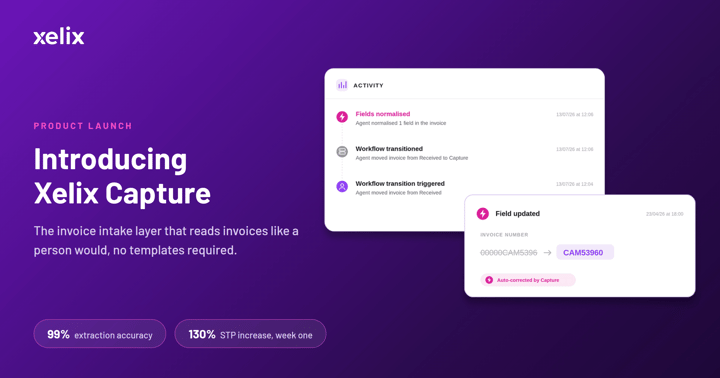
Xelix Capture extracts invoice data without templates or per-supplier setup, with 99% extraction accuracy.
Book a demo
What happens when a new supplier’s invoice arrives?
So, what do these key differences look like in context, when a new supplier invoice arrives and the AP team needs to set up the system to process it along with future invoices?
| Step |
Template OCR |
AI invoice capture |
| 1 |
Invoice arrives, with no existing template match within the business |
Invoice arrives as a PDF or Excel file |
| 2 |
Invoice falls to manual keying or the exception queue |
AI reads header and line items in context |
| 3 |
Template request is raised, built and tested |
Agents validate against AP’s rules and flag anything unusual to the AP team |
| 4 |
Invoice processed days later |
Clean data posts to the ERP or workflow |
| 5 |
Repeat when the supplier changes layout |
Agents are refined in natural language, so touchless rates improve over time |
Want to see it in action with your own invoices? Book a Capture demo.
How accurate is AI invoice capture compared with OCR?
The reality of AI invoice capture requiring minimal set-up and ongoing management may raise questions about its accuracy. But where template-based OCR relies on the quality of each template, AI invoice capture is designed to deliver consistency across invoice designs and suppliers, including changes and updates.
Accuracy is defined by the percentage of invoice data that is read correctly. But just looking at one accuracy figure doesn’t paint a representative picture. That’s why four metrics are typically used when defining accuracy:
- Header accuracy: how often the top-line details (for example, supplier name, invoice number, date and total) are read correctly
- Line-item accuracy: how often the items bought are read correctly
- Touchless rate: the share of invoices that go all the way through without human intervention
- First-pass yield: the share of invoices that come out right first time
However, while incorporating these four data points can provide a representative picture, it doesn’t mean all vendor figures are comparable. Where one vendor’s accuracy score may count whole invoices, another’s may only reflect specific or selected samples.
This is why it’s important to interrogate vendor figures. For example, are they per field, line or invoice? Do they include header data or just line items? Does the figure include poor- or low-quality invoice photos?
For a benchmark, Ardent Partners’ AP Metrics That Matter 2026 report puts the average invoice exception rate at 19.9%, and 11.8% for Best-in-Class teams. The average straight-through processing rate is 38.3%.
Xelix Capture delivers 99% extraction accuracy.
Is traditional OCR for invoices obsolete?
OCR isn’t obsolete, but the traditional template-based process is becoming outdated. AI invoice capture is template-free, understanding the content in context and removing the need for template set-up, updates and management.
Switching to AI invoice capture saves AP teams the time and cost associated with invoice set-up and owning the template library. With AI invoice automation, agents flag issues while the finance team spends its time on higher-value tasks.
Cost and ROI of switching from OCR to AI capture
The cost of switching from OCR to AI invoice processing software shouldn’t be viewed in isolation. The manual work OCR needs, including building and maintaining templates and checking accuracy, should be weighed against the return on investment (ROI) of AI automation.
With AI invoice processing, there are no templates to build or maintain, and individual cases are flagged for review. And these time and cost savings grow with the volume of invoices you process.
As an illustrative example, imagine an AP team handling 5,000 invoices a month, with 25% of these either from new suppliers or requiring manual intervention due to design updates, wrapped text or low-quality scans. This means 1,250 invoices that must be managed, alongside the manual checks on the remaining 3,750 to ensure accuracy.
With AI invoice capture, say 5% of those 5,000 invoices are flagged for potential errors or manual checks. That’s a fifth of the invoices to manage, before counting the time saved on accuracy checks.
To see where Capture fits ahead of your existing systems, read our white paper on the Xelix invoice intake layer.
How to choose between AI capture and OCR
How you manage your invoice process will likely depend on the time and effort required to manually reconcile templates. What is your new supplier count and churn rate? What is your invoice volume? Are all supplier invoices in the same language? What is your AP and IT team capacity?
Traditional template OCR may still work for your organisation if:
- Most of your invoices come from a small pool of suppliers
- Your suppliers rarely update or redesign their invoices
- Invoices are consistent in style, language and quality
- You have the resource to build and maintain a template library
- Manual checks are feasible for your invoice volume
However, you might consider switching to AI invoice capture if:
- You regularly onboard or source new suppliers
- It takes a while for new invoice templates to flow
- Templates regularly and silently break
- Your team spends significant time and resources checking and reconciling invoices
- Template management creates bottlenecks and delays
Depending on which of these descriptions most accurately reflects your current situation, you may benefit from AI invoice capture or be able to efficiently sustain a traditional OCR process.
Implementing AI invoice capture
Switching to AI invoice capture doesn’t have to be disruptive or daunting. With AI invoice capture, there are no templates to upload and no library to manage. Set-up involves six steps:
- Set up invoice intake: Decide how invoices reach the tool as and when they arrive
- Connect your ERP: So that clean invoice data feeds directly into your existing workflow
- Set exception rules: Telling the tool how to handle missing or unclear data
- Check security and data handling: Ask your vendor where data is stored and processed, whether it is used to train models, who can access it and which security certifications they hold
- Run alongside your current process: While you manage the switch, until you’re confident with the output
- Complete the switch: Once accuracy and touchless targets are met
Xelix Capture sits in front of the ERP and downstream AP systems. We have ISO 27001 and SOC 2 certifications and a team of dedicated services consultants to guide you through the switch.
Book a demo and test AI invoice capture with your own invoices
Spend less time reconciling inaccurate or inconsistent invoices with Xelix Capture, our invoice intake layer. Capture extracts invoice data in any layout, without templates or per-supplier setup, with 99% extraction accuracy.
Book a demo


.png?length=1024&name=Non-negotiable%20AP%20software%20features%20you%20must%20include%20in%20your%20next%20purchase%20%20Xelix%20(2).png)
-1.png?length=720&name=Non-negotiable%20AP%20software%20features%20you%20must%20include%20in%20your%20next%20purchase%20%20Xelix%20(1)-1.png)